System Requirements
Critical ComponentsThe following sections are necessary for iSqFt to operate correctly. Each computer on which you plan to access iSqFt should have these components installed. iSqFt Plans & Specs Viewer (required) The iSqFt Plans & Specs Viewer is required to view the project plans and specifications documents on our website. When you try to view a plan or spec for the first time on iSqFt you will be prompted to install the viewer if it is not already installed. Alternatively, you can download the iSqFt Plans & Specs Viewer by clicking on the Download Plug-ins link located under the Administration folder once you have logged in. Sun Java (required) Java software allows you to run applications called "applets" that are written in the Java programming language. iSqFt uses applets as part of our secure download system. To download the latest version of Sun Java, visit the Sun Java webpage by entering “www.java.com” into your browsers Address bar or by clicking the following link: Locate the Java Software Download link along the top of the page and click it. Click the Download Now button from the middle of the page. Click on the Begin Download button to start the download. Should you need them, additional instructions are listed below the Begin Download button on the download page on Java's site. Trusted Sites (for Internet Explorer 7 and 8) (required) If you are still using Internet Explorer 6, click here for instructions.
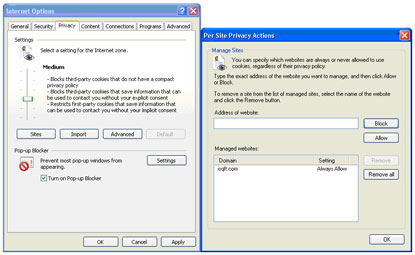
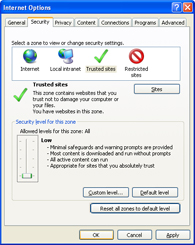 (click to enlarge) 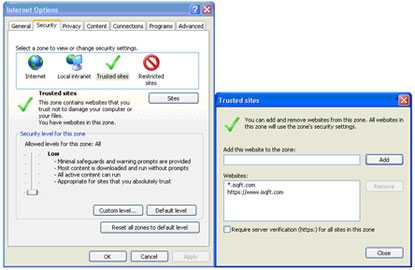 (click to enlarge) Privacy
 (click to enlarge) Caching Options If you are using Internet Explorer 6, on the general tab, first click on Settings and under “Check for newer versions of stored page” click “Every time I start Internet Explorer.” For disk space to use, I would recommend this number be no greater than 250MB. Click ok and back on the general tab, now click on Delete Files and delete all of your temporary files. When this is done, click ok until you are out of internet options. If you are using Internet Explorer 7, on the general tab, first click on Settings and under “Check for newer versions of stored page” click “Every time I start Internet Explorer.” For disk space to use, I would recommend this number be no greater than 250MB Click ok and back on the general tab, click on the “Delete…” button. Now click on “Delete Files” and delete all of your temporary files. When this is done, click ok until you are out of internet options. Lastly, within Internet Options (under Tools), under the Advanced tab, make sure both “Use HTTP 1.1” and “Use HTTP 1.1 through proxy connections” are checked. These are located under the HTTP 1.1 Settings section. System RequirementsThe following are the minimum and recommended requirements for your computer to work with iSqFt. Please note that at the moment iSqFt will not work correctly on Mac computers; a PC with a Windows operating system is required. More detailed information is available below.
Computer Hardware We recommend a computer with at least a 500mhz Pentium III processor, 512 MB of RAM, 1 GB disk drive, and a 17" monitor. In general the higher the processor speed and the more RAM available the faster the iSqFt web pages will display. We 'send' the project listings to your computer which must build the page to display. Adding memory is a relatively inexpensive upgrade that will dramatically improve your PC's performance. For maximum benefit we suggest at least 512 MB of RAM be installed. Increasing the monitor size will allow you to view more of the project details, plans and specs on-screen. Our suggested monitor size is 17", with 19" being the optimal size. Your screen resolution must be at least 1024x768. This will maximize the viewing area nicely on a 17" monitor. You can check your current screen resolution by going to the Control Panel > Display > Settings tab Operating System Today, iSqFt.com will run on all versions of Microsoft Windows 2000 and later. For users with earlier versions of Windows we strongly suggest upgrading to Windows 2000/2003/XP. To find out more about the available versions of Microsoft Windows and the hardware requirements of each, go to http://www.microsoft.com/windows. To ensure that you have the latest Windows updates installed on your computer, go to the Microsoft Windows Update site. This site will connect you to Microsoft and determine which updates your computer requires. Microsoft suggests that users install all critical and security related updates. Click here to check for updates now: http://windowsupdate.microsoft.com/. Web Browser To provide our subscribers with the best possible business level application, the iSqFt web site only supports the Microsoft Internet Explorer web browser. We do not support Netscape or any other browser type. Microsoft has discontinued support for all versions of Internet Explorer earlier than IE 6 and we suggest that you update to version 7. You can download Microsoft Internet Explorer 7 here. Internet Connection Speed While iSqFt.com was designed to allow subscribers to work using a dial-up modem, increasing your connection speed will have the single greatest impact on your ability to use the site. There are two main high-speed methods of accessing the internet: DSL and Cable modem. Generally, one of the two will be available in your area. A good source for information on high-speed internet connectivity can be found at SpeedGuide.net. |

"I have never encountered anyone that was as helpful, patient, and tolerant with someone not at all familiar with accessing files, downloading, retrieving files, etc. Your support representative made our company a believer in your product." |
||||